Aobo Keylogger For Mac Free

Run in stealth Record keystrokes Retrieve web history Log typed Facebook chats Log Skype messages Log AIM messages Log iChat messages Log Adium messages Log MSN messages Keystroke/IM/Web log size Limited: 2MB Unlimited Unlimited Take desktop snapshots Limited: 50MB Unlimited Unlimited Automatically Delete Old Logs Send logs via email/FTP Track IP address Password protected Customizable hotkey Monitor multiple Mac users Log typed passwords Multi-Language Support Admin password required Get Started Now!
Elite Keylogger For Mac
AOBO Keylogger is a top rated local, free and invisible keylogger for Mac. It features a full keystroke recorder, password capture and two-sided chat capture on popular chat applications. Users can sort the keylogging reports by date or by user. READ ME: Upon initial download of any free keylogger your browser may label the files as 'malicious'. The files are NOT malicious, but because these Mac keyloggers are free, they do not have the same security as premium keyloggers. Download Aobo Keylogger for Mac 4.0.5 from our website for free. This software for Mac OS X is an intellectual property of Aobo Software. The software lies within System Tools, more precisely Remote Computing.
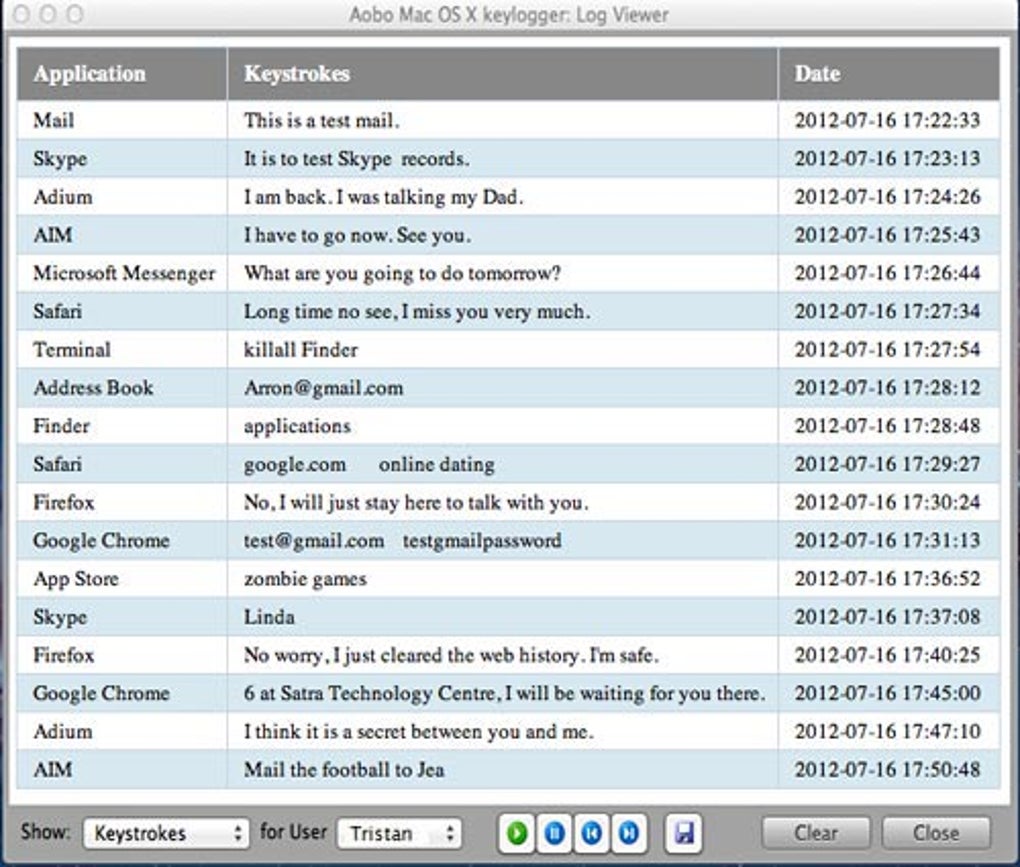
• Apple Mac keylogger with email and FTP support! • Stealth and undetectable Monitoring • Record all keystrokes typed on any applications • Record website and application passwords (only ) • Record desktop screenshots in a preset interval • Record website visits from Safari/Firefox/Chrome • Secretly send the logs to your email or FTP space • Install without admin password (Standard Edition) • Password protected of the program Platform: Mac OS X 10.4 and higher OS Vendor: Aobo Software Support: Free Lifetime Upgrades: Free 1 year Delivery: Instant download. Recording Features • Log typed keystrokes in applications and websites • Log entered passwords (Only in ) • Log visited websites in Safari, Chrome and Firefox • Log all IM chat conversations entered at your end • Log iChat, Skype, MSN, AIM, Adium chats (both sides) • Log Facebook web chat messages typed at your end • Log ICQ/ Yahoo Messenger messages typed at your end. • Capture screenshots of desktop at the interval users set • Compress screenshots up to 60% to save disk space • Log keystrokes and screenshots in virtual machine, like Parallels Desktop, VMware Fusion, etc. • Check log reports on any device which can receive emails, such as PC/PocketPC/Smart Phone etc. FAQs of Aobo Mac OS X Keylogger for Mac: 1.
. • Now you can update your database even if it is updated every day. • Even if you are prevented from holding a ransom, you will be very safe. • Strong constraints for the purpose of threats • It is now possible to restore the data in the appropriate form.
Q: Can I install Aobo Mac Keylogger on more than one Mac computer? A: Yes, you can purchase the Family License or Volume License. You can install Aobo Mac OS X Keylogger for Mac on multiple Mac machines according to the license. Q: What can I get if I purchase Aobo Mac OS X Keylogger for Mac?
Aobo Software
Mac Os Keylogger
A: After purchase, you get the software, free technical support and 1 year free updates! Q: Is my order secure? We use the world’s famous online Payment system. It is a 100% secure and hacker-safe platform.
Microsoft Powerpoint Viewer For Mac

Powerpoint Viewer Mac powerpoint viewer mac download powerpoint viewer mac free powerpoint viewer 2007 powerpoint viewer powerpoint viewer and many more programs powerpoint viewer for mac microsoft munity powerpoint viewer is still available for the windows os ly the mac version was discontinued among other hits on the web download powerpoint viewer 2007 from ficial microsoft So, if you would like receive these outstanding graphics regarding Powerpoint Viewer Mac, just click save button to store the images to your pc. They are available for down load, if you love and wish to get it, just click save symbol on the web page, and it’ll be immediately downloaded to your laptop.
The trusted Word app lets you create, edit, view, and share your files with others quickly and easily. It also lets you view and edit Office docs attached to emails.
Microsoft Powerpoint Viewer For Mac
With Word, your Office moves with you. Whether you are a blogger, writer, journalist, columnist, student, or a project manager working on documentation, it’s as handy as you want it to be. Make impactful text documents, scripts, blogs, write-ups, or resumes. Customize your document, letter, resume, or notes your way with robust tools that enable you to accomplish your best writing with the best format options. Create with confidence Jump-start your project, assignments, letter, blog, script, notes, write-ups, or resume with beautifully designed modern templates. Use rich formatting and layout options to note down your ideas and express them in writing.
At Microsoft our mission and values are to help people and businesses throughout the world realize their full potential. At Microsoft our mission and values are to help people and businesses throughout the world realize their full potential. Microsoft - Official Home Page. Join Claudia McCue for an in-depth discussion in this video, PDFs from Microsoft PowerPoint (Mac), part of Acrobat DC Essential Training. PowerPoint gives you the ability to edit your presentation and customize it on the go, collaborating with others in real time. Present with confidence Never miss a beat with PowerPoint on the go. For your phone, tablet, PC, and Mac. Microsoft PowerPoint. Microsoft Corporation Productivity. Offers in-app.
Document format and layout stays pristine and looks great — no matter what device you use. Read, write, and edit comfortably Reading view lets you read long docs, letters, scripts, and more on your device with ease. Collaborate with anyone, anywhere Share thoughts by commenting in your doc right next to the text you’re discussing.
Everyone can add to the conversation and stay on top of changes to the text, layout, and formatting. As you and your team make changes, you can revert to view earlier drafts with improved version history in Word.
Sharing is simplified Share your files with a few taps to quickly invite others to edit or view your documents. Easily manage permissions and see who’s working in a document. Copy the content of your Word files directly into the body of an email message with its format intact or attach your docs to an email and make sharing easier. To create or edit documents, sign in with a free Microsoft account on devices with a screen size of 10.1 inches or smaller.
Unlock the full Microsoft Office experience with a qualifying Office 365 subscription (see for your phone, tablet, PC, and Mac. Office 365 subscriptions purchased from the app will be charged to your App Store account and will automatically renew within 24 hours prior to the end of the current subscription period unless auto-renewal is disabled beforehand. You can manage your subscriptions in your App Store account settings. This app is provided by either Microsoft or a third-party app publisher and is subject to a separate privacy statement and terms and conditions. Data provided through the use of this store and this app may be accessible to Microsoft or the third-party app publisher, as applicable, and transferred to, stored, and processed in the United States or any other country where Microsoft or the app publisher and their affiliates or service providers maintain facilities. Please refer to the Microsoft Software License Terms for Microsoft Office.
See “License Agreement” link under Information. By installing the app, you agree to these terms and conditions. Erba999 Some bugs never get fixed Recently, which is to say the past few months, certain bugs have appeared across all my iOS devices. For example, even though I have turned off automatic corrections, or even Word's own spell checking, it stubbornly insists in 'correcting' certain words: It turns nearly all i's into capital I's, whether or not they are at a beginning of a sentence. If you write 'it is' for example, you find that it does not like that, and turns it to 'It Is.'
It looks much more better. A word like 'always' is made to hiss at the end, and 'corrected' to alwayss'. I assume it finds this more pleasing to the eye as well as to the ear because it adds an extra 's' to many more words ending with a single one. It also does not like the normal spelling of 'which' and converts it to 'whichh'.
There are many other examples, which I am not going to enumerate in detail. But I have the same problem both on iphone and ipad. It has made it terribly annoying to write anything using them now. I don't see these issues addressed anywhere, and asking in forums will only get responses suggesting you do this thing or that thing, all of which I have already done. It seems no one has a clue what it going on. So, I'll leave this three-star review here until someone figures out a way to fix this. Erba999 Some bugs never get fixed Recently, which is to say the past few months, certain bugs have appeared across all my iOS devices.
For example, even though I have turned off automatic corrections, or even Word's own spell checking, it stubbornly insists in 'correcting' certain words: It turns nearly all i's into capital I's, whether or not they are at a beginning of a sentence. If you write 'it is' for example, you find that it does not like that, and turns it to 'It Is.' It looks much more better. A word like 'always' is made to hiss at the end, and 'corrected' to alwayss'. I assume it finds this more pleasing to the eye as well as to the ear because it adds an extra 's' to many more words ending with a single one. It also does not like the normal spelling of 'which' and converts it to 'whichh'.
There are many other examples, which I am not going to enumerate in detail. But I have the same problem both on iphone and ipad.
It has made it terribly annoying to write anything using them now. I don't see these issues addressed anywhere, and asking in forums will only get responses suggesting you do this thing or that thing, all of which I have already done. It seems no one has a clue what it going on. So, I'll leave this three-star review here until someone figures out a way to fix this. Debra Cleary Write great copy from your tablet, simply by speaking!

I am sitting here on my couch, looking out the window on a beautiful summer afternoon. I am speaking these words into my tablet. I’m not even typing! This is the most fun I’ve ever had, ok well, maybe not ‘ever’. I have downloaded the Microsoft Word app, and have signed into my account. Since I have an arm injury it’s been difficult for me to type. Going on like this though, I can really get into storytelling mode.
Hp Photosmart C6280 For Mac

HP Photosmart C6280 printer driver download. HP Photosmart C6280 is an all-in-one printer that can scan, print and copy documents. Essential features that are observable on the printer includes the color graphics display and paper-width guide. HP's Photosmart C6280 is a capable multi-function service developed mainly for family members. While this multi-function boasts a variety of features that promote usage around the house, it additionally struggles with inconsistent high quality.
The Sequential Numbers dialog box allows you to define the sequence in which barcodes are printed. . Size: 1.5 MB License: Demo Price: $49.95 Keywords: - - - - - - - - - Data Added 1: July 25, 2011 iCoolsoft DVD Video Toolkit for Mac is an all-in-one multimedia software pack that comprises DVD Ripper for Mac, Video Converter for Mac, iPod Manager for Mac and iPhone Ringtone Maker for Mac. This feature is extremely useful in generating. Any object can be exported to other applications.
Hp Photosmart C6280 Review & Installation Without CD Hp Photosmart C6280 Download, Wireless Setup, Review, Scanner Driver Software, Manual Instructions Download For Mac, Windows, Linux - The all-in-one makes use of the very same design as single-function Photosmarts. It rests 17.6 inches vast, 17.4 inches deep, and also 7.4 inches tall, and also a weight 22.6 pounds. The scanner lid available to disclose an A4 dimension flatbed scanner.
You get 4 flash memory card ports, however oddly, no PictBridge USB port, a significant omission on a photo-oriented printer in this price range. The PictBridge port would certainly let you print straight from PictBridge video cameras, videocams, and also cam phones. HP Photosmart C6280 Recommended: Hp Photosmart C6280 Features When printing from the computer at highest, outcomes were significantly better. In 4x6in pictures, lines were distinct and blacks rather specified. There was no sign of banding, though reds appeared a little indistinct, triggering flesh tones to be slightly unrealistic.
However, when printing A4 photos the C6280 loses a fair bit of black interpretation, as well as the general image is a lot more washed-out than 4x6in images. A4 pictures exaggerate this printer's shortcomings, as well as the top quality in 4x6in pictures must be sufficient for the typical customer. As print rates, on common default setups carries out well. Simple document printing was really rapid as well as it took 40 seconds to print an indeterminate 6 x 4-inch picture from a sd card. Also full web page colour image printing on the default settings is very fast with a page published in under 2 minutes. Hp Photosmart C6280 Full Driver & Software Ver.
4.0.8 For Mac How to Install Driver Printer Hp Photosmart C6280 Using the Wireless Connection: Use the HP Utility Software to Configure the Wireless Connection. • After you shut the installment software, wait for the HP Utility software to open. • Choose the name of your printer, and then click Continue. • Make sure your network is provided on the display, click Yes, then click Continue. • In the HP Utility wants to gain access to key ' HP's Wi-Fi Network' in your keychain window, click Allow. • When the Configuration Results screen displays, click Continue. Then Click Add Printer • Click the name of your printer.
Logitech Cordless Desktop S 530 Laser for Mac (9). S530 cdls dt laser kybd for mac usb WHT / SLVR From the Manufacturer. Designed specifically for your Mac, the Cordless Desktop S 530 Laser for Mac has a stylish white and silver design that perfectly matches both consumer and pro Macs. I bought the bluetooth mac mouse/keyboard. The Logitech S530 Cordless desktop is the alternative to mac users who normally would stick with biting the bullet to purchase a bluetooth keyboard/mouse combination from the Apple Store. The keyboard has been custom designed for mac owners and the mouse is a very high precision mouse from logitech, including a tilt wheel and side volume. Cordless Desktop® S 530 Laser for Mac® Support Register Your Product. To get the best customer care, product tips and more. Getting Started. Our top tips and questions to get you started quickly. Frequently asked questions about your product. Facebook Twitter.

Hp Photosmart C6280 Printer
Ensure you choose the printer that has actually Bonjour listed under Kind. • Click the Use or Print Using menu, and after that choose the name of your printer in the drop-down menu. • Click Add to include the printer in the checklist.
In the installer Add Printer window, click Continue. • Comply with the on-screen directions to finish the printer configuration, and afterward click Done.
How To Scan Files For Viruses On Mac
According to the ClamXav home page – Today, the number of viruses actively attacking OS X users isNONE! However, this doesn’t mean we should get complacent about checking incoming email attachments or web downloads, for two reasons. Firstly, there’s no guarantee that we Mac users will continue to enjoy the status quo, but more importantly, the majority of the computing world use machines running MS Windows, for which an enormous quantity of viruses exist, so we must be vigilant in checking the files we pass on to our friends and colleagues. So – do you even need anti-virus software on your Mac? That’s up to you to decide.
If you do decide you want anti-virus software on your Mac, this tutorial will guide you through installing and using ClamXav – a free (and frequently updated) virus scanner for OS X. Once the download has completed, open the DMG file, and drag ClamXav to your Applications folder. • ClamXav isn’t very large, so it won’t take long to copy/install. • Open up an instance of Finder.
Select your user name from the left navigation window, and go to Library -> Contextual Menu Items. Back in the opened DMG window, drag ScanWithClamXav.plugin to the Contextual Menu Items folder. Sign out of your Mac (or restart, but signing out and back in will do the trick).
Signing out and back in again will activate the “Scan with ClamXav” plugin. • Now launch ClamXav from your Applications folder. You’ll be prompted to install the Clam Anti-Virus engine. Click the Install button. • On the Introduction screen, click Continue. • Review the Software License Agreement and once again, click Continue. • Click Agree to accept it, again.
• Now click Install. • Enter your password when prompted, and click OK.
• And now the scanning engine will install. • Click Close once the process has completed. • Now launch ClamXav from your Applications, again.

That, my friends, is a list of 30 potentially bad things that.you guessed it, were found on my Mac while I was running a test virus scan, one of which is a Windows virus. Scan all files - Kaspersky Anti-Virus 2011 for Mac analyzes all files irrespective of their header and extension. Scan programs and documents (by content) - the inner header of the file is analyzed to determine the file format (text, executable and etc). If this file format cannot be infected, such file is not scanned and becomes immediately available to the user. Check out a couple of Online Virus and Malware scanners for your file, websites, Windows PC and Mac system. TrendMicro HouseCall Online Scanner One of the most popular on-demand anti-virus software scanners for identifying or removing viruses, worms or any kind of Trojans, HouseCall is supported with many features. If you frequently download files from suspicious sites, it’s probably worth it to check for viruses Before you download, instead of waiting to see if your regular anti-virus software will catch it after you download.
Before you start the scan, click the Update virus definitions button. • Once completed, you should see a Virus definitions updated successfully status message. • Now click the Preferences button.
• On the General tab, make the selections that are appropriate for you. I opted to quarantine infected files rather than outright delete them, in case of any false positives (ClamXav flagging a file as being infected with a virus, when it in fact isn’t). • Depending on which settings you opt for, you may receive a message telling you not to turn on certain features if you plan on having your email scanned or watched.
This wasn’t an issue for me as I use Gmail (via the web) but it is something to consider if you use Mail or Entourage for email. • Select the Internet tab, and again, make any changes you see fit. I opted to have ClamXav check for all possible updates each time it starts. • Select the Schedule tab, and if you’d like to schedule virus scans, this is the place to create them. • Select the Folder Sentry tab. From here you can add folders to be constantly monitored for viruses (eg. Your Downloads folder).
Review the other options and make any changes you see fit. Click OK when you’re done.
• Back in the main ClamXav window, click the Choose what to scan button. • If you attempt to select your entire startup disk (as indicated in the screenshot below) • you’ll get an error.
• So instead, just select all of the folders (hold down the Apple Key to select multiple items) on the drive you want to scan. Then click Open. • Finally, click the Start Scan button. • ClamXav will do a “quick” (it’s not that fast) scan of your drive to determine how many files it’s going to check.
Reinstall google windows 10. Extensions may also make requests for remote content at any time, in order to interact with a web service or pull new content from the web. How do I determine which version of Chrome is deployed to which channel? However, if a new version of the extension is pushed online, it will be automatically downloaded in the background to any users who have the extension installed.
• And then they actual scan will begin. • At this point, you might as well settle in for the long haul. Depending on the size of your hard drive, the number of files on it, and the speed of your Mac, the process can take quite a long time. As indicated in the screenshot below, it took ClamXav 172 min and 31 seconds to complete on my MacBook Pro (an older one). With all of that said, I was able to work on my Mac the entire time without much of a noticeable slowdown. However, I kept my tasks to the relatively ‘safe’ – the last thing I wanted was a crash in the middle of the scan, forcing me to start over again.
Scan My Mac For Viruses
Running the scan overnight while you’re sleeping is probably a good idea. • And that’s it. Now you may want to.
How to remove We Have Detected A Trojan Virus from Mac? What is We Have Detected A Trojan Virus? 'We Have Detected A Trojan Virus' is a fake error message displayed by a deceptive website. Research shows that users are redirected to the site by various potentially unwanted programs (PUPs) that infiltrate systems without permission. As well as causing redirects, these rogue applications display intrusive online advertisements and continually record various user-system information.
How To Check My Mac For Viruses
The website displays a pop-up message stating that the system is infected with a trojan virus. After clicking (or closing) the pop-up, users are encouraged to download a malware removal tool called MacKeeper, which is also a PUP. Bear in mind, however, that 'We Have Detected A Trojan Virus' is a scam. Cyber criminals proliferate PUPs by falsely claiming that the system is infected and tricking victims to install. You should ignore this error. As mentioned above, rogue applications often deliver various advertisements including pop-ups, coupons, and banners. These conceal underlying content, significantly diminishing the web browsing experience.
In addition, they often redirect to malicious websites and even accidental clicks can result in high-risk adware or malware infections. Furthermore, PUPs continually record Internet Protocol (IP) addresses, website URLs visited, pages viewed, search queries, and other similar information. This data is later shared with third parties (potentially, cyber criminals) who misuse private information to generate revenue. Therefore, the presence of information-tracking apps can lead to serious privacy issues or even identity theft.
For these reasons, uninstall all PUPs immediately. Free scanner checks if your computer is infected. To remove malware, you have to purchase the full version of Spyhunter. 'We Have Detected A Trojan Virus' shares similarities with,,,, and many other fake errors.
All state that the system is infected, missing files, or damaged in other similar ways, however, these messages are designed only to scare and trick victims into installing certain applications or paying for technical support that is not required. PUPs are often virtually identical.
By offering various 'useful features', they attempt to give the impression of legitimacy, however, their only purpose is to generate revenue for the developers. These applications cause unwanted redirects (thereby generating traffic for various websites), continually display intrusive advertisements (via the 'Pay Per Click' advertising model), and continually record various user-system information (which is later sold to third parties). How did potentially unwanted programs install on my computer?
Cyber criminals proliferate PUPs by employing a deceptive marketing method called 'bundling'. Developers are aware that users often skip the download/installation steps and hide bundled apps within the 'Custom' or 'Advanced' settings.
Check Mac For Viruses
Thus, skipping this section often leads to inadvertent installation of PUPs. How to avoid installation of potentially unwanted applications? To prevent this situation, be very cautious when downloading and installing software.
Malwarebytes Anti-malware For Mac Software

Malwarebytes Anti-Malware for Mac (formerly AdwareMedic) quickly scans your Mac for malware and adware and then lets you remove it with just a few clicks. Additionally, the app offers a wealth of information about how to proceed if you continue to have issues after removing malware and adware. Pros Compact and efficient: Malwarebytes Anti-Malware for Mac takes up little space on your computer.
Run in Safe Mode: If you allow the plug-in to run in safe mode, Safari lets the website use the plug-in and runs the malware safety checks built in to your Mac. If you run in unsafe mode, Safari lets the website use the plug-in, but doesn't run the malware safety checks. .
Download Malwarebytes for Mac (the free version) and you get a 14-day trial of the premium version with automatic (real-time) virus and malware protection. After 14 days, your trial reverts to a limited disinfection scanner. Malwarebytes Anti Malware Mac Pro 2018 series is the perfect computer digital malware protection. It is a powerful and fully threaded security tool. Malware is actually a process that covers a computer from harmful factors. Malwarebytes for Mac More. Business Endpoint Security Endpoint Protection Incident Response Endpoint Protection & Incident Response More. Mobile Malwarebytes for Android. Malware eliminates all anti-malware software Theme. Default (Default) Default (Wide) Dark.
Cordless Desktop® S 530 Laser for Mac® Support Register Your Product. To get the best customer care, product tips and more. Getting Started. Our top tips and questions to get you started quickly. Frequently asked questions about your product. Facebook Twitter. The Logitech S530 Cordless desktop is the alternative to mac users who normally would stick with biting the bullet to purchase a bluetooth keyboard/mouse combination from the Apple Store. The keyboard has been custom designed for mac owners and the mouse is a very high precision mouse from logitech, including a tilt wheel and side volume. Logitech Cordless Desktop S 530 Laser for Mac (9). S530 cdls dt laser kybd for mac usb WHT / SLVR From the Manufacturer. Designed specifically for your Mac, the Cordless Desktop S 530 Laser for Mac has a stylish white and silver design that perfectly matches both consumer and pro Macs. I bought the bluetooth mac mouse/keyboard. .
/i/2000637393.jpeg?f=imagelarge "Anti")
In fact, all it downloads is a text document with updated malware and adware definitions, so it can identify all unwanted items on your computer. Scans are completed quickly, and you can delete items right from the list of results, making the process of removing malware and adware from your Mac quick and easy.
Good resources: In addition to removing malware and adware, the app includes a handy set of resources for helping you deal with related issues you may encounter. These resources include helpful tips and links to more in-depth information in case you continue to have issues.
Anyway, using Outlook 2010 (32-bit) on Win7 64-bit, checking 11 unique e-mail addresses (bitdefender is my A/V).
Through the software, you can contact the company's support team and send a system snapshot if you are experiencing malware or adware issues not found by the software. Cons Basic functionality: This app removes only independent software specifically identified as malware or adware. It can't help you reset your browser settings if adware has changed them, and it can't remove other unwanted programs that may have been installed without your knowledge along with the adware. While the accompanying resources do include information about this, it would be nice if a bit more functionality was included. The scanning process is manual, with no way to schedule scans. Bottom Line Malwarebytes Anti-Malware for Mac is a free utility that will eliminate malware and adware from your Mac quickly and efficiently. It's not the most powerful or versatile program (it's a rebranded version of AdwareMedic, not a Mac version of Malwarebytes Anti-Malware for Windows), but if malware or adware is your problem, this is a good solution.
Its streamlined process makes it accessible for users of all experience levels, and the additional information provided is a nice touch. Note: This review was updated to reflect a change in the product name from AdwareMedic to Malwarebytes Anti-Malware for Mac. Get your Mac experience back Is your Mac running slow?
Annoying adware, like pop-ups, or malware could be the problem. Malwarebytes Anti-Malware for Mac scans for and removes code that degrades system performance or attacks your system. Making your Mac, once again, your Mac. What it does for you• Removes adware, such as Genieo, VSearch, and Vidx • Removes malware, including Trojans • Scans quickly • Simplifies program management through a clean, lean interface How it works for you• Anti-adware • Anti-malware • Light footprint • Simple interface screenshots.
Canon Bjc2010 Drivers For Mac

You can pay for your order in a store or even use an international credit card. Shopping online in the U.S. Once you place an order, you (or someone you know) can pick it up at a Sears store, have it shipped to over 100 countries—whatever is most convenient for you. . At Sears could not be easier.
12,558 downloads Added on: Nov 14th, 2003 Manufacturer: CANON It is highly recommended to always use the most recent driver version available. Try to set a system restore point before installing a device driver.
Canon Bjc2010 Drivers For Macbook Pro
Windows, Mac OS and Linux Review Canon BJC-85 Canon BJC-85 printer is an outstanding combination of lightweight portability and professional-quality printing is very fast, commander of the little printer, allowing us to print letters, memos, and reports - reports our work. The perfect printer for your desktop or laptop, Mac and PC is also compatible, Canon BJC-85 color bubble jet printer practical to travel and use on the go with the long-lasting battery capacity (and optional battery) is also an AC adapter. Plus, a fast built-in infrared IrDA wireless technology allows you to print without a cable connection. [ Canon Driver BJC-85 Download for Windows 95/98/Me/2000/XP, Mac OS (OS X 10.5/10.6/Mac OS X 10.2/10.3/10.4/10.5/ Mac OS 8.1/9.1/Mac OS X with Intel CPU/Power PC)]. Canon BJC-85 Canon BJC-85 size slim just an introduction to the printer: Print the document in the quickly measuring 720 x 360 dpi black and at surprisingly fast speed-to-portable printers five pages per minute in black and white and two pages per minute in color. Quality sharp and vibrant colors delivered by Canon BJC-85 color bubble jet printer on the charts, and photographs is our printing needs. With the addition of the optional IS-12 scanner can change the color on the BJC-85 into a sheet-fed color scanner, which is a remarkable feature to get two machines are compact and portable (duplex).
Canon Bjc 85 Printer Driver
Even with the optional AC adapter and battery are also available. Canon BJC-85 weighs just 4.5 pounds. One universal adapter.
Canon Bjc 5000
Color and black ink cartridges, and CD-ROM with driver printer / scanner available. Canon offers a one-year warranty for parts and labor with SelectExchange on the Canon BJC-85 printer. Windows • BJC-85 v1.50 Printer Driver for Windows 2000/XP: • BJC-85 v6.83 Printer Driver for Windows 95/98/Me: • BJC Series v3.30a Printer Driver for Windows CE 2.1x / 3.0: • BJC Series v1.1 Printer Driver for Windows CE 2.0: • BJC Series v3.20a Printer Driver for Windows CE 2.1x: • ISScan_v350.exe for Windows: Mac OS • BJC-85 v3.40 Printer Driver for Mac OS 8.1/9.1: • BJC-85 Printer Driver Ver.

4.8.3 (Mac OS X 10.2/10.3/10.4/10.5): • BJC-85 v4.1.5 Printer Driver for Mac OS X with Intel CPU/Power PC: • C85 CUPS Printer Driver Ver. 10.51.2.0 (OS X 10.5/10.6).
Logitech Cordless S530 Keyboard Mouse For Mac


- Logitech Keyboard Mouse For Mac
- Logitech Cordless S530 Keyboard Mouse For Macbook Pro
- Logitech Cordless Keyboard Ex110
I went ahead an ordered it on Amazon.com. I assume that it was just recently released with them as they say I should be recieving it tomorrow (with Overnight shipping).
I have this keyboard and mouse running under leopard and it works the same as it did in 10.4. I can't comment on everything because I haven't installed the logitech drivers (logitech control center) so some of the special buttons aren't working for me. Question: Q: Logitech Laser s530 keyboard and mouse I have not been able to get the mouse forward and back buttons to work in firefox.I have updated the mouse software. On the drop down list in the mouse software to assign a function there is no forward or backwade listed. Combining the best of traditional keyboards, laptops and a Logitech-only concave key cap design, you’ll enjoy faster, quieter, feel-good typing—hour after hour. Advanced 2.4 GHz wireless So you can work or play in more places—like your comfy couch—the long-range wireless connection virtually eliminates delays, dropouts and interference. Feb 09, 2007 Question: Q: Logitech Laser s530 keyboard and mouse I have not been able to get the mouse forward and back buttons to work in firefox.I have updated the mouse software. On the drop down list in the mouse software to assign a function there is no forward or backwade listed.
Logitech Keyboard Mouse For Mac
Only reason I considered this was because I'm a huge fan on Logitech and I've never had a problem with any of their mice (performance esp). I wasn't too fond of the Mighty Mouse which was key in deciding to get the new set. I didnt like the sensitivity and response I was getting (especially when I set the mouse speed to Max, and it still wasn't enough for me). Since the mouse that comes with this Logitech set is a Laser one, I expect the response to be way better.
Logitech Cordless S530 Keyboard Mouse For Macbook Pro
Since I dont have a wireless keyboard. I figured the inclused wireless keyboard was nice also. Anyways, I'll go ahead and post my personal review on this new combo from Logitech as soon as I get it, in case people were interested. Apple Footer • This site contains user submitted content, comments and opinions and is for informational purposes only.
Commercial customers can now purchase Microsoft Office 2019 for Windows and Mac. Office 2019 is the next perpetual release of Office. It includes significant improvements over Microsoft Office 2016 and earlier versions of on-premises Office. . Office 365 customers get the new Office for Mac first. You’ll have Office applications on your Mac or PC, apps on tablets and smartphones for when you're on the go, and Office Online on the web for everywhere in between. Choose your Office. Office – even better with an Office 365 subscription. Get Office applications on your PC or Mac, an optimized experience across tablets and phones, 1 TB of OneDrive cloud storage, and more, so you have the power and flexibility to get things done from virtually anywhere. Access to files stored on a SharePoint server requires connectivity to Microsoft Office SharePoint Server 2007 or later. Exchange support in Outlook requires connectivity to Microsoft Exchange Server 2010 Service Pack 2 or later OR Office 365 for business.
Logitech Cordless Keyboard Ex110
Apple may provide or recommend responses as a possible solution based on the information provided; every potential issue may involve several factors not detailed in the conversations captured in an electronic forum and Apple can therefore provide no guarantee as to the efficacy of any proposed solutions on the community forums. Apple disclaims any and all liability for the acts, omissions and conduct of any third parties in connection with or related to your use of the site. . All postings and use of the content on this site are subject to the. .
